 Help Center Doctor
Find and replace across every Zendesk help center article
A product rename, a new domain, a changed phone number, a phrase legal wants gone. In Zendesk Guide that means opening every article. Help Center Doctor does it in one pass, with a preview of each change.
The problem
The Guide editor edits one article at a time and has no search and replace across the help center. When the same string appears in 300 articles and 3 languages, the job is 900 manual edits, and every edit is a chance to miss one or break formatting.
Zendesk's answer in May 2021 was that the editor was not a focus of the development cycle. The thread is still marked Parked in September 2026. One user described copying all the HTML into an external editor to find and replace, then pasting it back, article by article.
How people handle it today
- Editing each article by hand, often with the browser's find on the editor page. Slow, and translations are easy to forget.
- Copying the HTML out and back in. Works for one article; risky for many, because a paste can drop attributes or bring inline styles along.
- API scripts. A developer writes a script against the Help Center API. It works, but there is usually no preview, no snapshot and no undo, and the script needs an API token with write access.
- A hosted vendor app. Swifteq Help Center Manager lists find and replace for text and HTML; it runs as a hosted application with a Swifteq account (as shown on the marketplace on 2026-09-05).
How Help Center Doctor solves it
- One search, every article, every language. Titles and bodies, any subset of your enabled languages, plain text or regular expressions with capture groups, match case and whole words.
- Three scopes so you cannot break markup by accident. Visible text only (tags, links and attributes are never touched), links and images only (href and src, perfect for a domain change), or raw HTML for experts, with a warning.
- Live preview with a diff. Matches are counted per article and field, shown with context, and each change has a word-level diff. Untick anything you do not want.
- Apply with a safety net. A snapshot of every affected article is downloaded before the first write, one write per article and language, and the whole change set can be undone from Activity.
- No token, no vendor account. The app uses your Zendesk session inside Zendesk and stores nothing on any server.
Previewing is free on every plan. Applying replacements needs Pro at $29 per account per month. See the Find and replace guide for the options and examples.
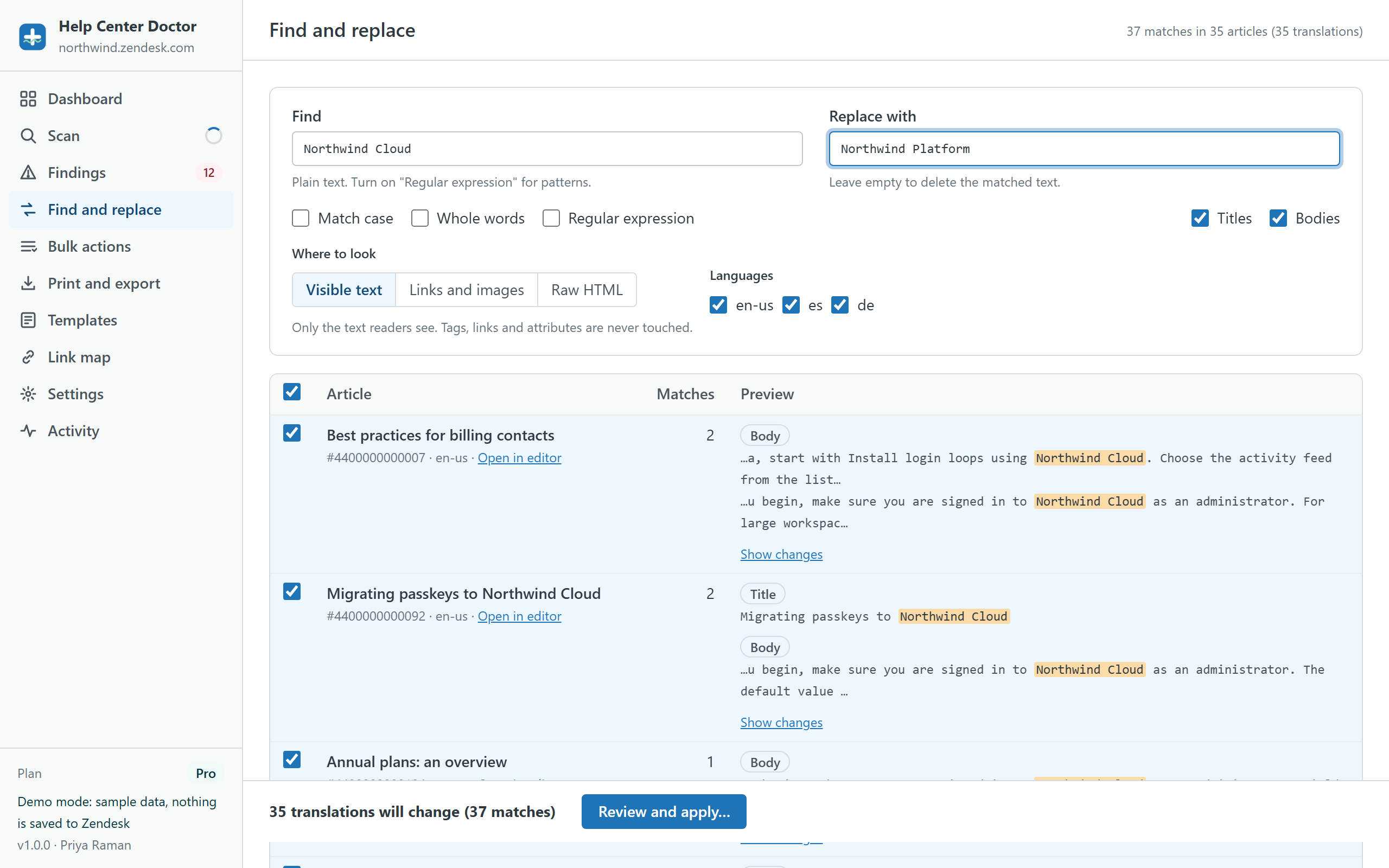
Try a rename on sample data
The demo help center mentions "Northwind Cloud" in dozens of articles. Replace it, review the diffs, apply, undo. Nothing is saved anywhere.